
아네스AI 사용 매뉴얼aness AI User Manual
거래 문의Enquiries
AI 챗봇이 24시간 다국어로 바이어 문의를 받고, 중요한 문의는 담당자가 이어받습니다.An AI chatbot takes buyer enquiries around the clock in many languages; you take over the ones that matter.
2026년 9월 기준 · 화면을 클릭하면 크게 볼 수 있습니다.As of September 2026 · click any screenshot to enlarge.
※ 화면 이미지를 클릭하면 크게 볼 수 있습니다.※ Click any screenshot to enlarge.
내 챗링크 공유하기Share your chat link
바이어가 문의를 남길 수 있는 링크를 받아 우리 채널에 붙입니다.Get the link buyers use to send enquiries, and put it on your own channels.
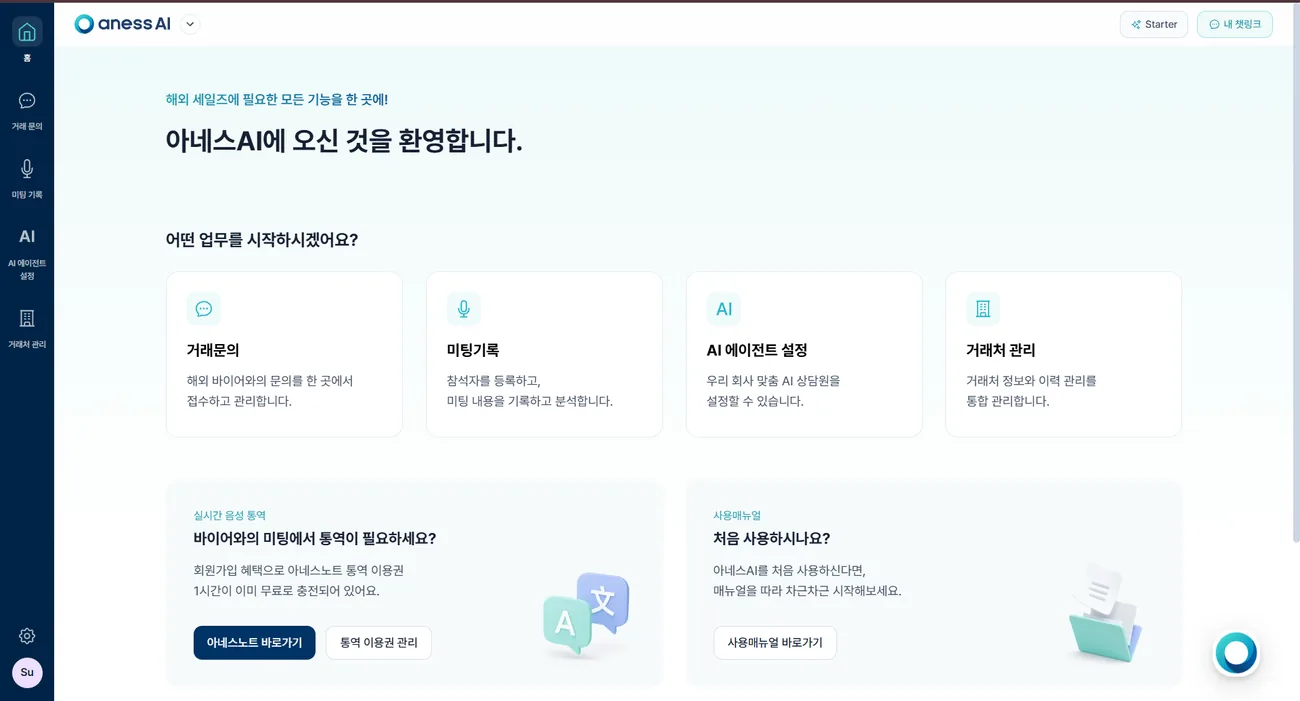
- 1아네스AI 대시보드에 로그인합니다. 대시보드는 PC · 노트북 화면에 맞춰 만들어져 있어 데스크톱 브라우저에서 여시는 것이 편합니다.Log in to the aness AI dashboard. It is built for desktop and laptop screens, so a desktop browser works best.
- 2우측 상단 [내 챗링크] 를 클릭해 링크를 복사합니다. 이 주소는 바뀌지 않으므로 한 번 배포하시면 계속 쓰실 수 있습니다.Click [My chat link] at the top right and copy it. The address never changes, so you can hand it out once and keep using it.
- 3홈페이지 · 상품 페이지 · 카탈로그 · 이메일 서명처럼 바이어가 닿는 곳에 링크를 넣습니다.Put the link wherever buyers will see it — your website, product pages, catalogues, e-mail signatures.
 2
2이 매뉴얼의 탭 이름과 순서는 이 메뉴와 같습니다. 홈은 따로 탭을 두지 않고 이 1번 탭 첫 화면에서 함께 다룹니다.The left menu is all of aness AI: Home, Enquiries, Meeting Records, AI Agent Settings, Partners, with Settings at the bottom.
This manual uses the same tab names and order. Home has no tab of its own — it is covered here, on the first screen of tab 1.
바이어에게 보이는 화면What the buyer sees
링크를 받은 바이어는 이런 순서로 문의를 남깁니다.This is how a buyer who opens your link sends an enquiry.
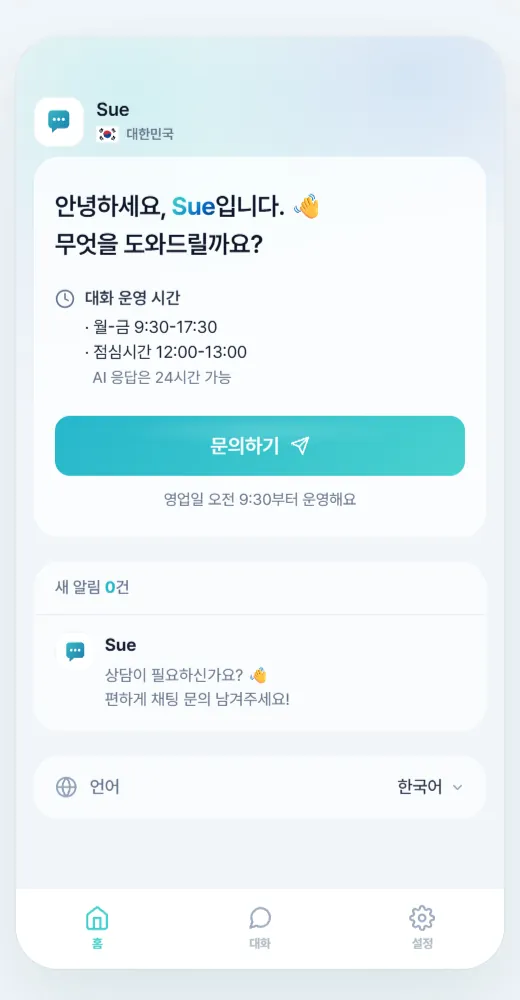
- 1링크를 열면 문의 채팅창이 뜹니다.The link opens a chat window.
- 2창 하단에서 대화 언어를 고릅니다. 바이어는 자기 언어로 쓰면 됩니다.They pick a language at the bottom and write in it.
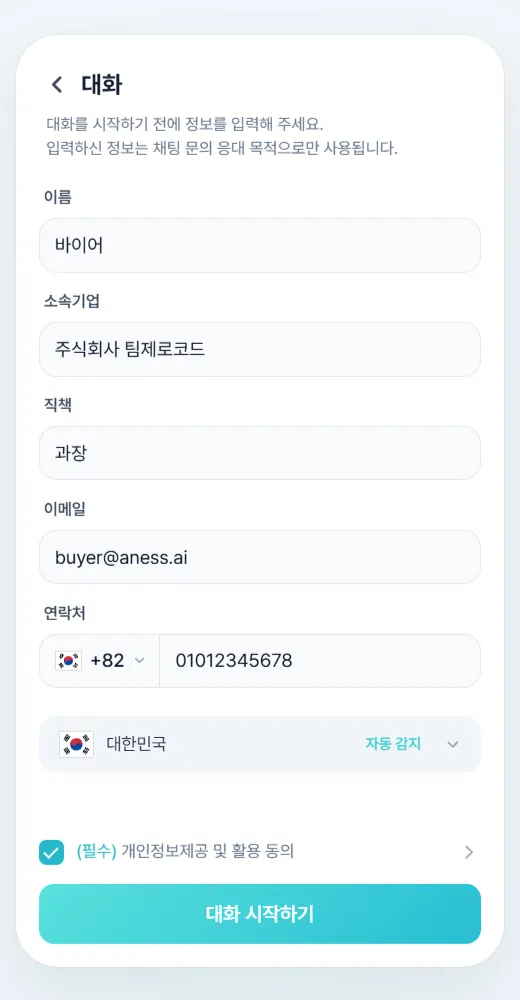
- 3[문의하기] 를 누르고 이름 · 소속 기업을 입력하면 대화가 시작됩니다.They press [Start enquiry] and enter a name and company, and the conversation begins.
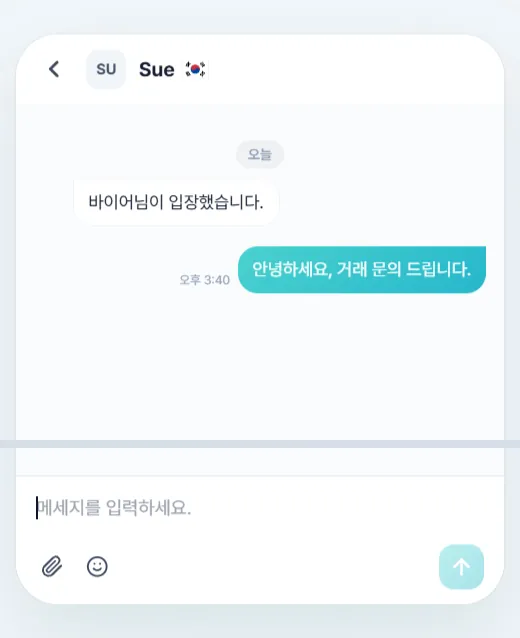
- 4AI 챗봇이 학습된 자료를 근거로 자동 답변합니다. 담당자가 자리에 없어도 대화가 이어집니다.The AI chatbot answers automatically from the material it has been trained on, so the conversation continues even when nobody is at the desk.
Uploading it first changes the answers noticeably.
문의 내역 확인하기Review incoming enquiries
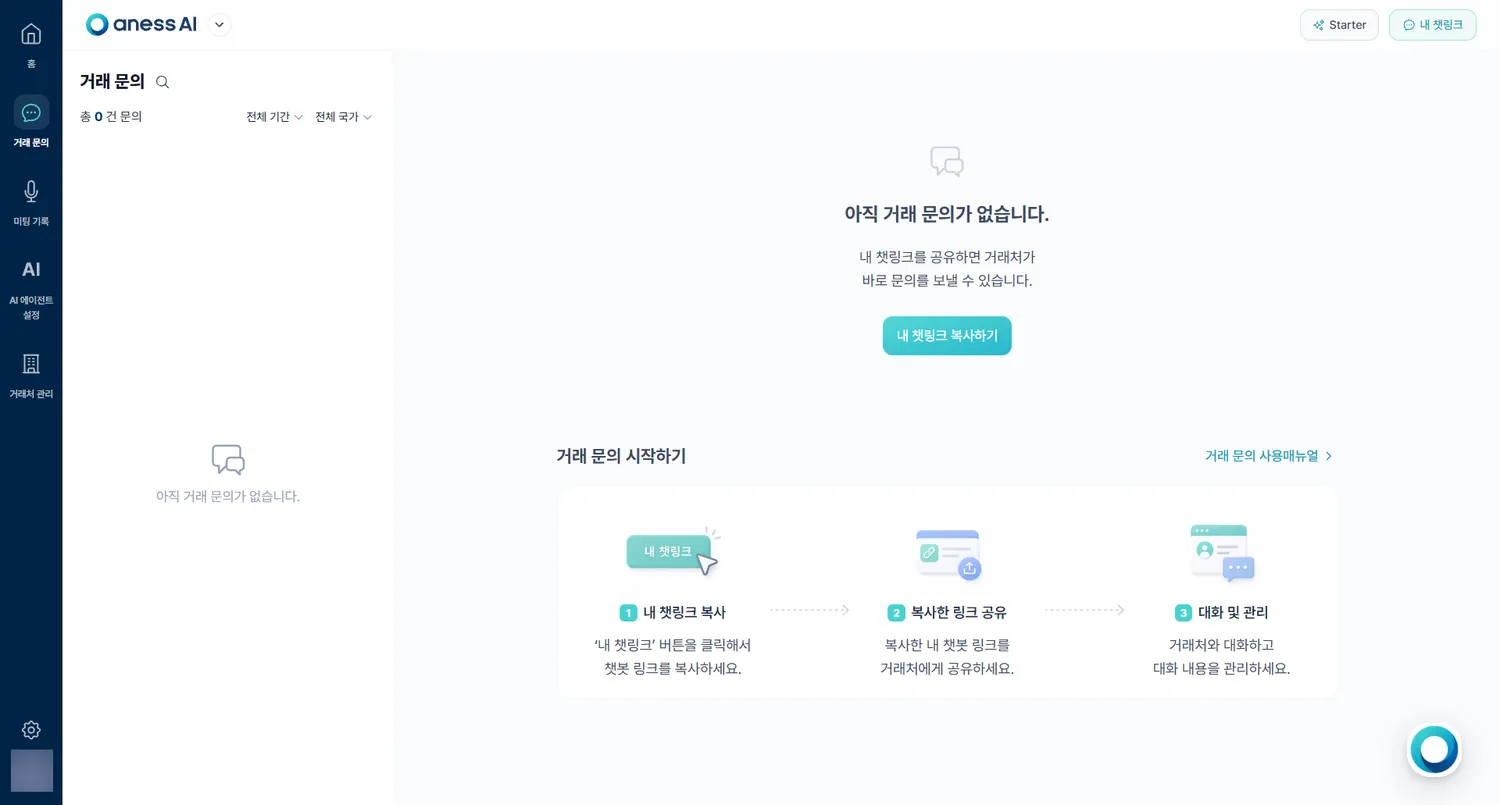
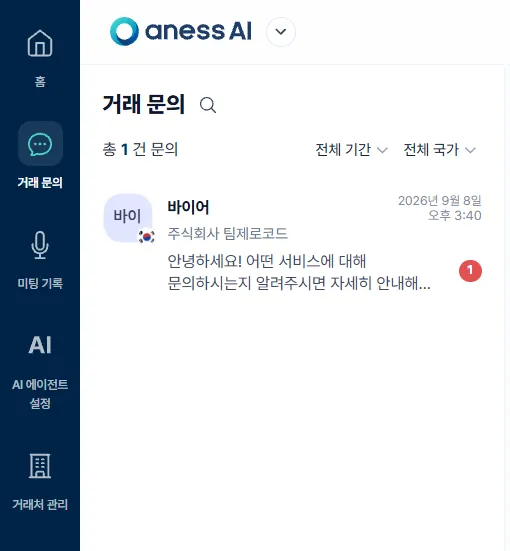
들어온 문의와 AI가 보낸 답변이 대화별로 쌓입니다.Every enquiry and every AI reply is filed conversation by conversation.
- 1좌측 메뉴 [거래 문의] 를 엽니다.Open [Enquiries] in the left menu.
- 2바이어별 대화 목록에서 문의 내용과 AI 답변을 함께 확인합니다.The list is by buyer — you see the enquiry and the AI reply together.
Then answer it yourself, following step 4 below.
담당자가 직접 답하기Answer it yourself
중요한 문의는 AI를 끄고 담당자가 이어받습니다.Turn the AI off and take over when an enquiry matters.
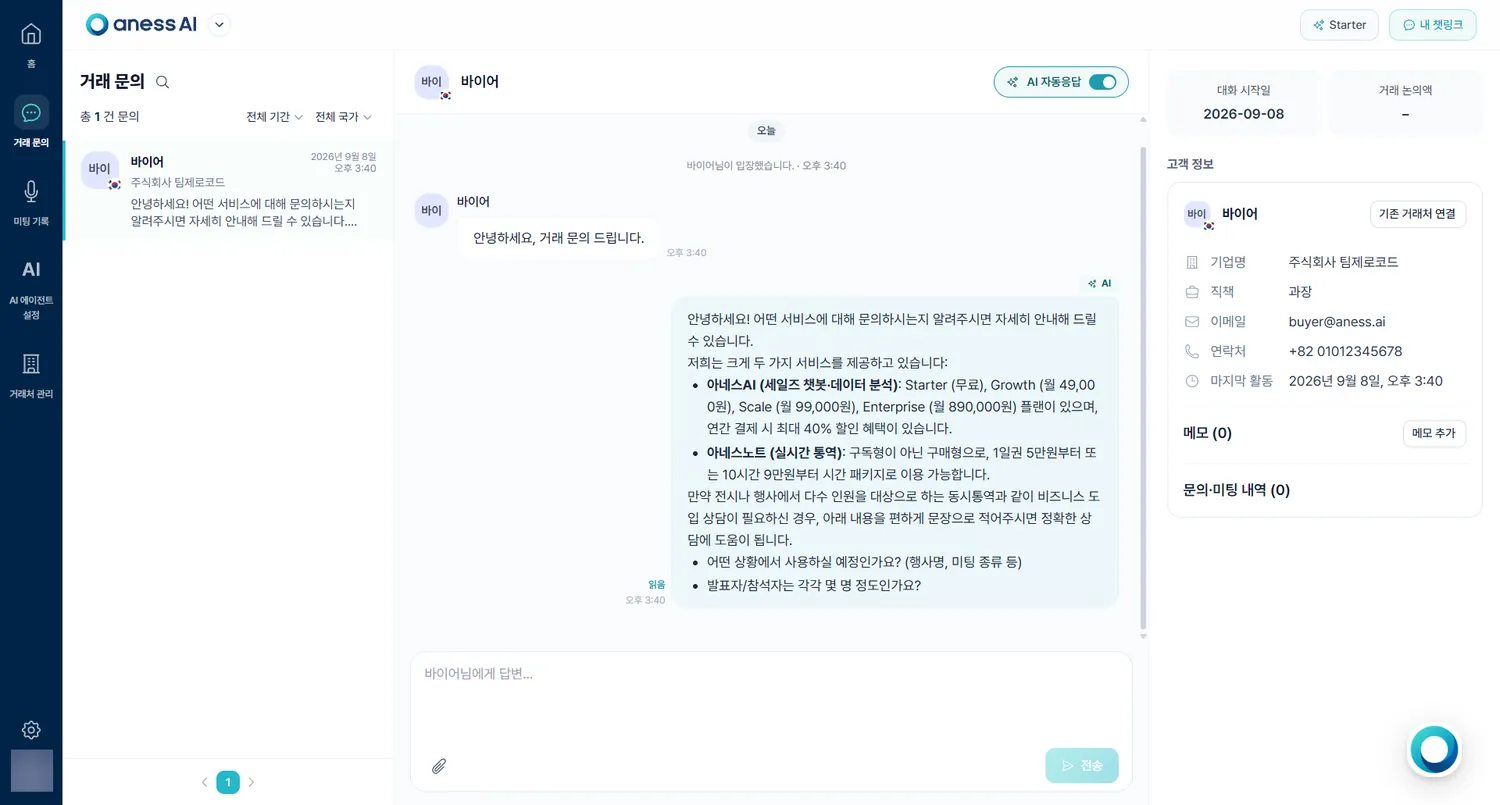
- 1해당 대화창 우측 상단 [AI 자동응답] 을 끕니다.Switch [AI auto-reply] off at the top right of that conversation.
- 2담당자가 직접 답변을 씁니다. 다시 켜면 AI가 이어받습니다.Write the reply yourself. Switch it back on and the AI takes over again.
- 3우측 [고객 정보] 패널에 바이어가 입력한 기업명 · 직책 · 이메일 · 연락처가 그대로 담깁니다.
[기존 거래처 연결] 을 누르면 이미 등록된 거래처와 같은 기업으로 묶을 수 있습니다.The [Customer] panel on the right carries whatever the buyer entered — company, job title, e-mail, phone.
[Link to an existing partner] merges them into a record you already have.
 13
13아네스AI 사용 매뉴얼aness AI User Manual
미팅 기록Meeting Records
아네스노트로 진행한 통역이 요약 · 핵심 포인트 · 액션 아이템으로 정리됩니다.Interpretation you ran with anessNote comes back as a summary, key points and action items.
2026년 9월 기준 · 화면을 클릭하면 크게 볼 수 있습니다.As of September 2026 · click any screenshot to enlarge.
※ 화면 이미지를 클릭하면 크게 볼 수 있습니다.※ Click any screenshot to enlarge.
미팅 목록 살펴보기Browse the meeting list
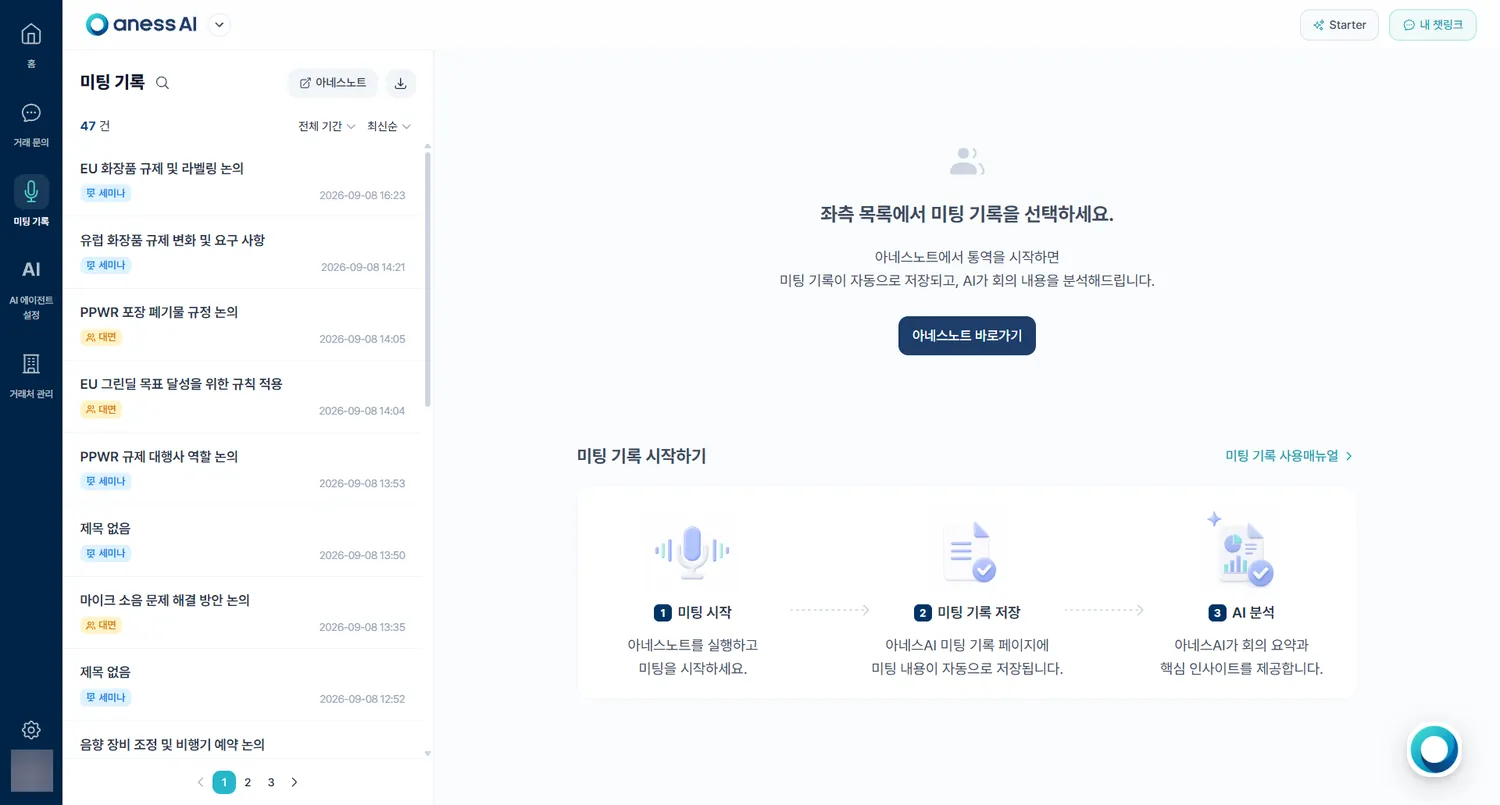
아네스노트로 진행한 통역이 모두 여기에 쌓입니다.Every interpretation you ran with anessNote lands here.
- 1좌측 메뉴 [미팅 기록] 을 엽니다.Open [Meeting Records] in the left menu.
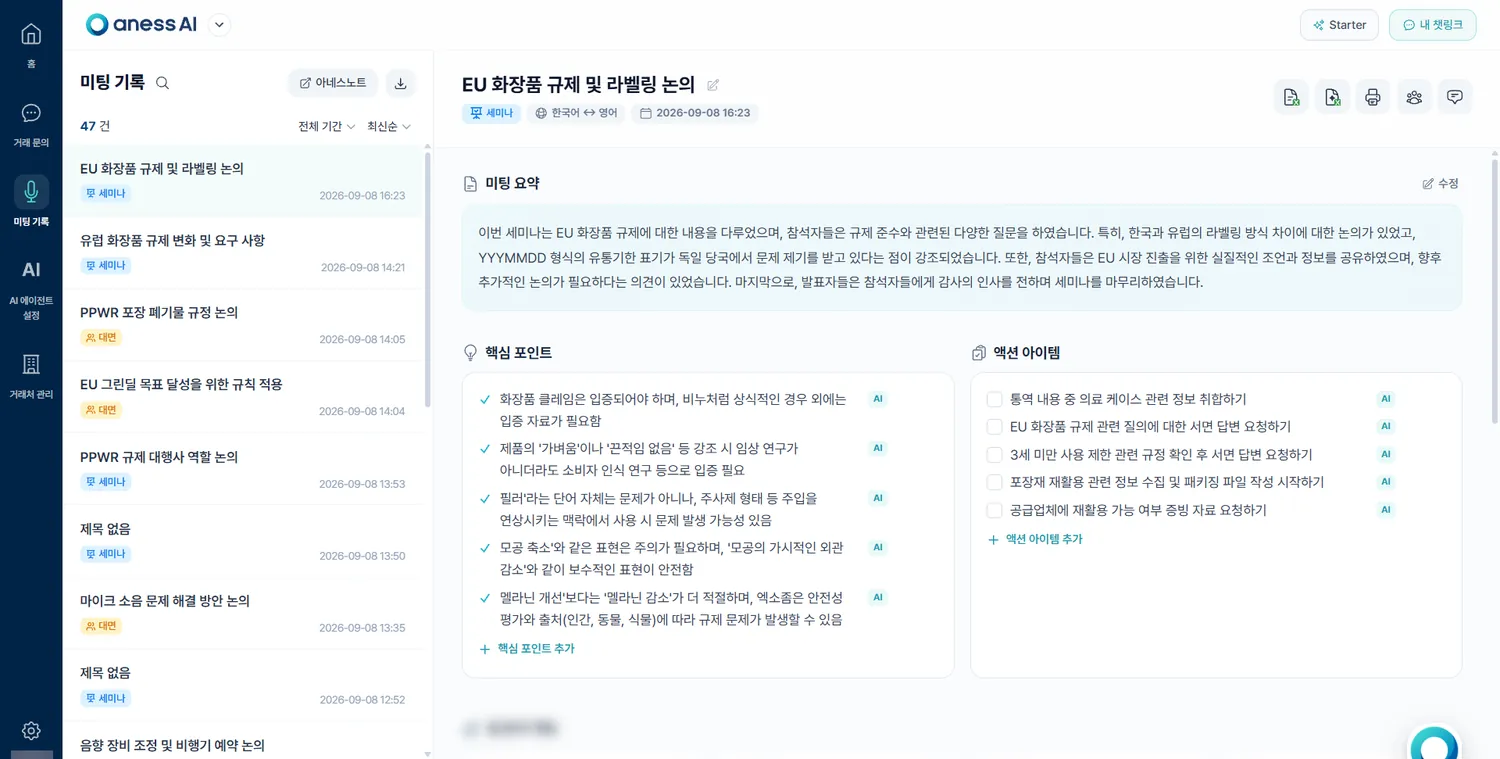
- 2좌측 목록에 제목 · 대면/화상 구분 · 참석 기업명 · 시작 시간이 표시됩니다.The list shows the title, whether it was in person or a video call, the attending company and the start time.
- 3확인하실 미팅을 선택하면 우측에 세부 내용이 열립니다.Select a meeting and its detail opens on the right.
세부 내용 확인하기Read the detail
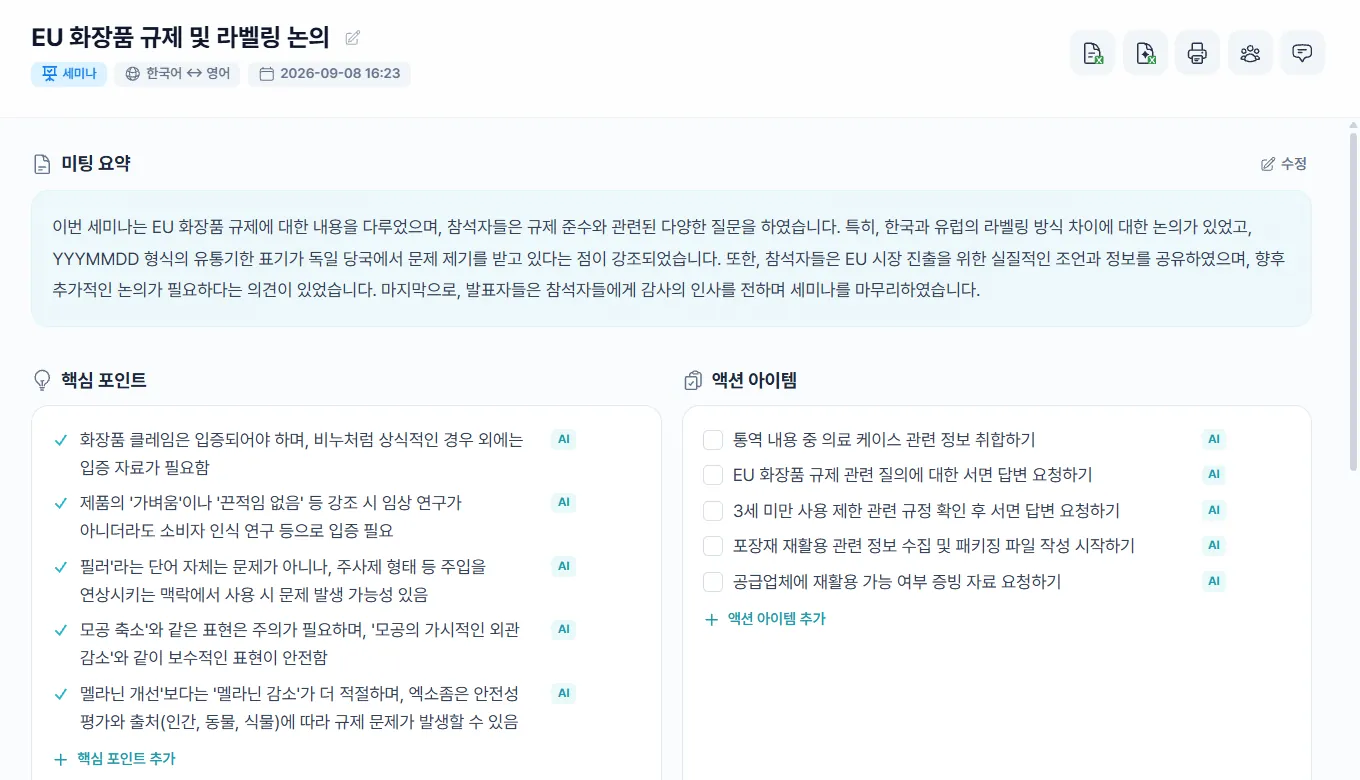
AI가 정리한 요약 · 핵심 포인트 · 액션 아이템을 확인합니다.Check the AI’s summary, key points and action items.
- 1미팅 정보 — 제목, 참석자 국가 · 기업명, 대면/화상 유형, 통역 언어쌍, 시작 일시Meeting information — title, attendee country and company, in-person or video, the language pair, and the start time.
- 2미팅 요약 — AI가 300자 이내로 자동 정리합니다.Summary — written automatically by the AI, under 300 characters.
- 3핵심 포인트 — 3~5가지로 추려집니다. 직접 고쳐 쓰실 수 있습니다.Key points — three to five of them, and you can edit them.
- 4액션 아이템 — 3~5가지 후속 조치. 체크박스로 완료 표시를 남기실 수 있습니다.Action items — three to five follow-ups, each with a checkbox to tick off.
참석자 등록 · 메모 관리Attendees and memos
누구와 만났는지 남겨 두면 상담일지가 채워집니다.Recording who you met is what fills in the consultation report.
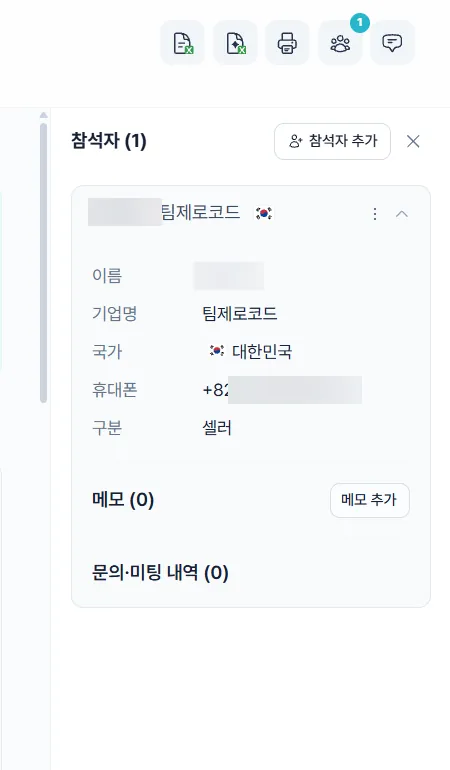
- 1우측 상단 [참석자 보기] 로 참석자 정보를 확인하고 추가합니다.Use [View attendees] at the top right to check and add attendees.
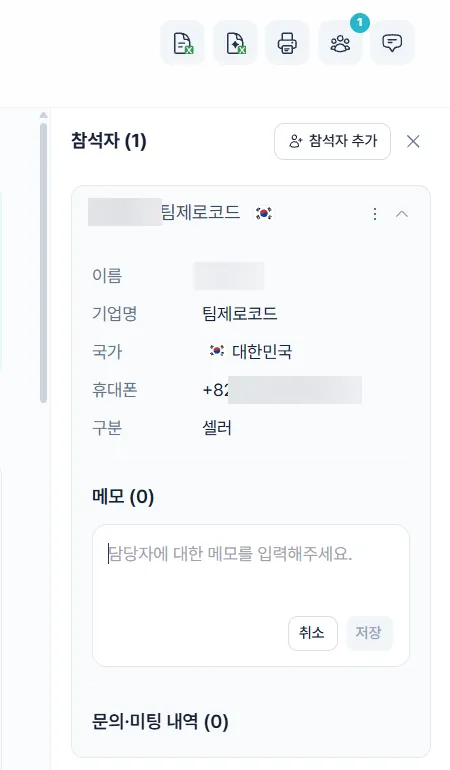
- 2[메모 작성] 으로 통역에 담기지 않은 내용을 따로 적어 둡니다. 추가·삭제가 자유롭습니다.Use [Add memo] for anything the interpretation did not capture. Add and delete freely.
 1
1[참석자 추가](1)로 등록합니다The [Attendees] panel — name, company, country, contact and role.
[Add attendee] (1) registers one
 2
2Right after the meeting is when it is most accurate.
내려받기 · 인쇄Download and print
미팅 상세 화면 우측 상단 아이콘으로 기록을 받습니다.The icons at the top right of the record hand it over as a file.
- 1[로데이터 다운로드] — 통역 원문과 번역문 전체를 파일로 받습니다.[Download raw data] — the full original and translated transcript as a file.
- 2[상담일지 다운로드] — 정량 정보와 함께 거래 가능성 · 구매력 · 신뢰도 등이 점수로 정리된 분석을 받습니다.[Download consultation report] — the figures plus a scored read on deal likelihood, purchasing power and reliability.
- 3[리포트 인쇄] — 요약 리포트를 인쇄하거나 PDF로 저장합니다.[Print report] — print the summary report or save it as a PDF.
- 4[참석자 보기] — 이 미팅에 등록된 참석자를 확인하고 추가합니다.[View attendees] — see who is registered for this meeting, and add more.
- 5[메모 작성] — 통역에 담기지 않은 내용을 따로 적어 둡니다.[Add memo] — jot down anything the interpretation did not capture.
 12345
12345Add them under 4 [View attendees] above first.
아네스AI 사용 매뉴얼aness AI User Manual
AI 에이전트 설정AI Agent Settings
우리 회사 자료와 용어를 미리 학습시켜 챗봇 답변의 정확도를 올립니다.Train the chatbot on your own material and terminology so its answers hold up.
2026년 9월 기준 · 화면을 클릭하면 크게 볼 수 있습니다.As of September 2026 · click any screenshot to enlarge.
※ 화면 이미지를 클릭하면 크게 볼 수 있습니다.※ Click any screenshot to enlarge.
지식 베이스에 자료 넣기Add material to the knowledge base
챗봇이 답변 근거로 쓰는 자료를 올립니다.Upload the material the chatbot answers from.
- 1좌측 메뉴 [AI 에이전트 설정] 을 엽니다.Open [AI Agent Settings] in the left menu.
- 2분류를 만들어 자료를 정리합니다. 예를 들어 회사 소개 · 제품 카탈로그 · 기술 스펙 · 가격 정책 처럼 나누시면 관리가 쉽습니다.Create categories to organise it — company profile, product catalogue, specifications, pricing and so on.
- 3분류마다 파일을 올립니다. 챗봇은 이 자료를 근거로 바이어 문의에 답합니다.Upload files into each category. The chatbot answers from this material.
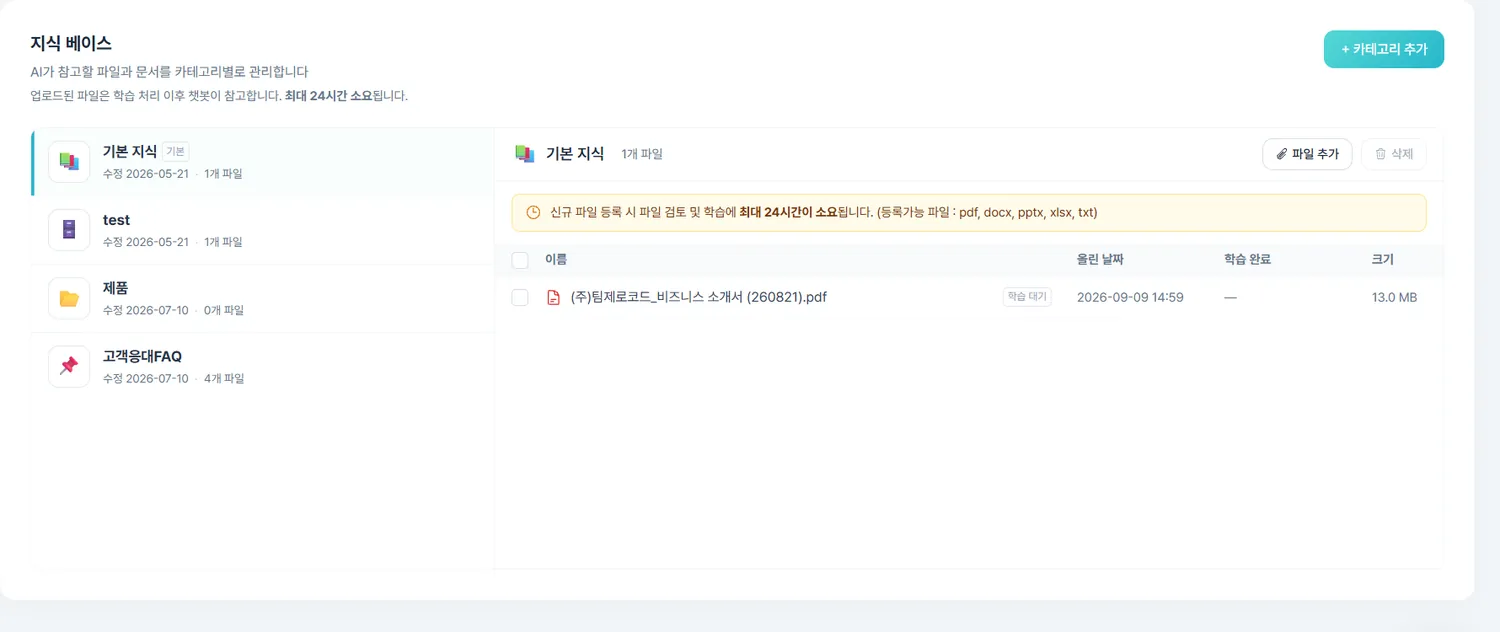 2
2자료가 정확할수록 답변도 정확해집니다.Delete anything out of date and keep only the current version. A discontinued catalogue left in place is a catalogue the chatbot will quote. Accurate material, accurate answers.
다국어 용어집 관리하기Manage the multilingual glossary
제품명처럼 정확한 표현이 중요한 용어를 미리 등록합니다.Register the terms that have to come out exactly right.
- 1[AI 에이전트 설정] 안에서 [다국어 용어집] 으로 내려갑니다.In [AI Agent Settings], scroll to [Multilingual glossary].
- 2[언어 추가] 로 쓰실 언어를 켭니다. 한국어가 기준이고, 영어 · 독일어 · 일본어 · 중국어 · 베트남어 · 아랍어 등을 열 수 있습니다.Use [Add language] to switch on the languages you need. Korean is the base; English, German, Japanese, Chinese, Vietnamese and Arabic are among the options.
- 3[+ 용어 추가] 로 한국어 용어와 각 언어 번역을 입력합니다.Use [+ Add term] to enter the Korean term and its translations.
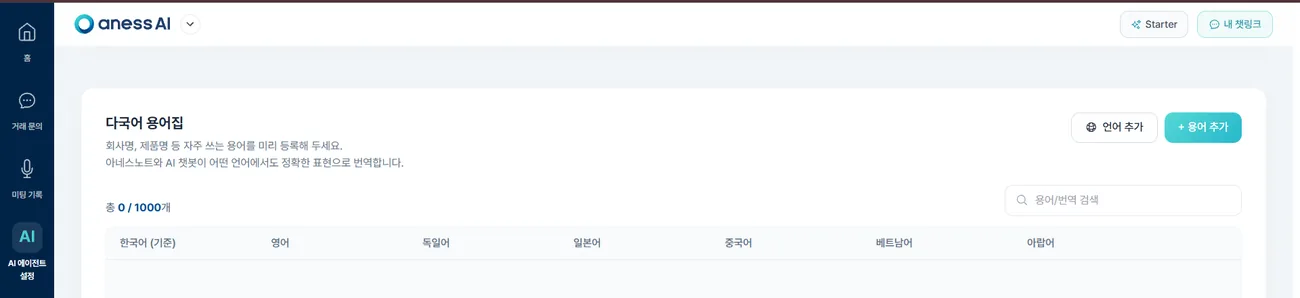 23
23등록한 용어는 AI 챗봇 답변과 아네스노트 통역에 함께 적용됩니다. 계정당 1,000개까지 등록하실 수 있습니다.Register the terms that must not drift — product and brand names, specifications.
They apply to both the chatbot’s answers and anessNote’s interpretation.
Up to 1,000 terms per account.
아네스AI 사용 매뉴얼aness AI User Manual
거래처 관리Partners
문의와 미팅에서 만난 기업 정보가 자동으로 쌓이고, AI 기업 검증 리포트가 함께 만들어집니다.Companies you met accumulate automatically, each with an AI verification report.
2026년 9월 기준 · 화면을 클릭하면 크게 볼 수 있습니다.As of September 2026 · click any screenshot to enlarge.
※ 화면 이미지를 클릭하면 크게 볼 수 있습니다.※ Click any screenshot to enlarge.
거래처 목록 보기The partner list
문의와 미팅에서 만난 기업이 자동으로 쌓입니다.Companies you met through enquiries and meetings accumulate on their own.
- 1좌측 메뉴의 건물 아이콘 — [거래처 관리] 를 엽니다.Open [Partners] — the building icon in the left menu.
- 2채팅 문의로 들어온 기업과 미팅 참석자로 등록한 기업이 자동으로 등록됩니다. 따로 입력하실 필요가 없습니다.Companies that arrive through chat enquiries and those registered as meeting attendees are added automatically — no typing needed.
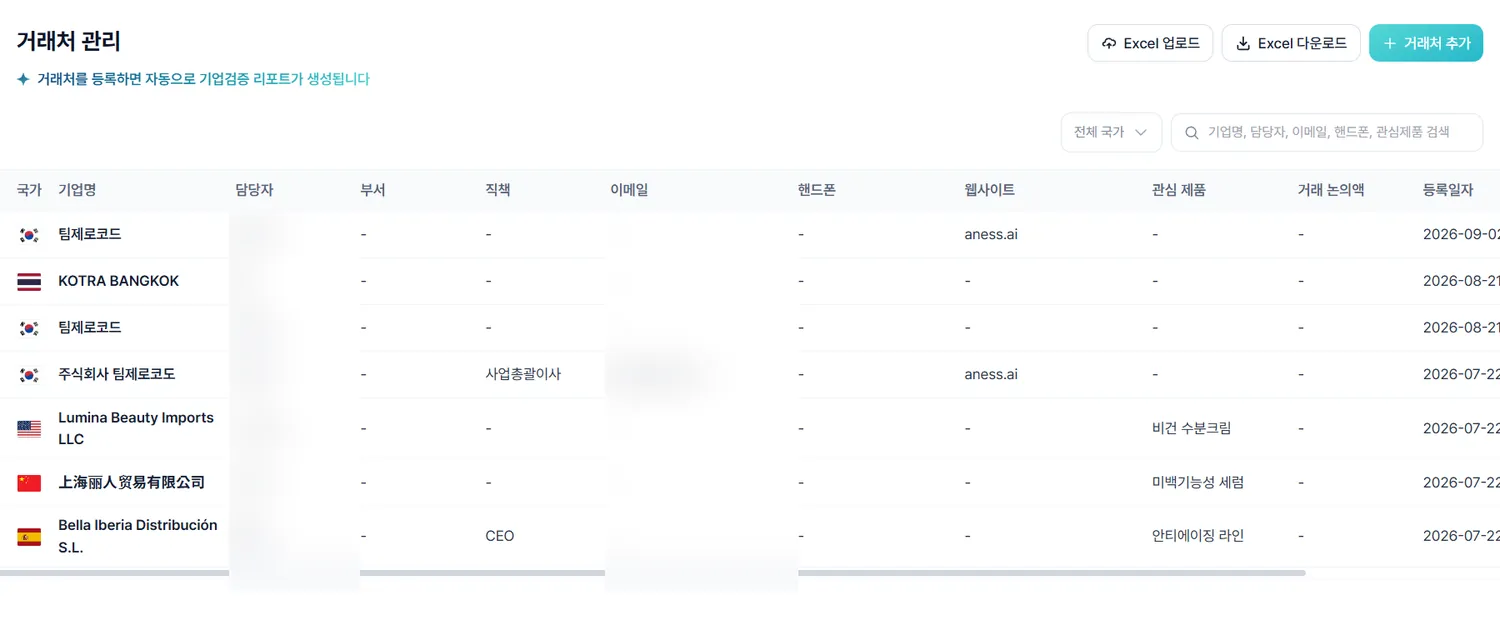 1
1AI 기업 검증 리포트AI company verification report
등록된 거래처마다 검증 리포트가 자동으로 만들어집니다.A verification report is generated for every partner on file.
- 1거래처를 선택하면 AI 기업 검증 리포트가 함께 열립니다. 따로 요청하실 필요 없이 자동으로 생성됩니다.Select a partner and the AI company verification report opens with it — it is generated automatically.
- 2상대 기업을 처음 만나기 전에 이 리포트를 먼저 보시면 상담 준비에 도움이 됩니다.Reading it before you first meet a company is good preparation.
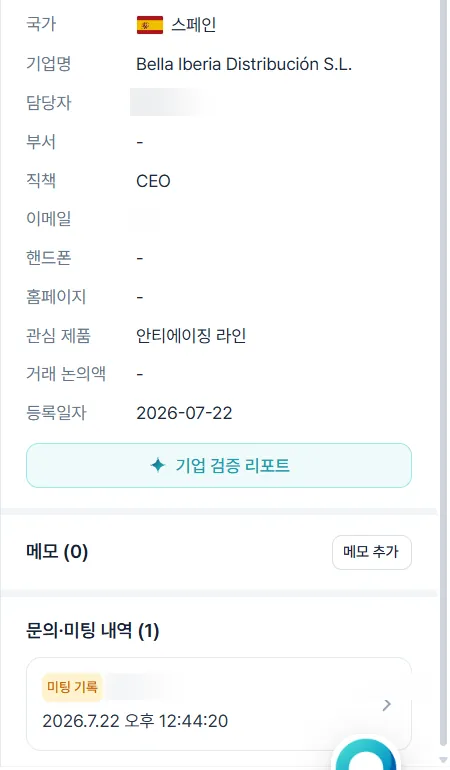 1
1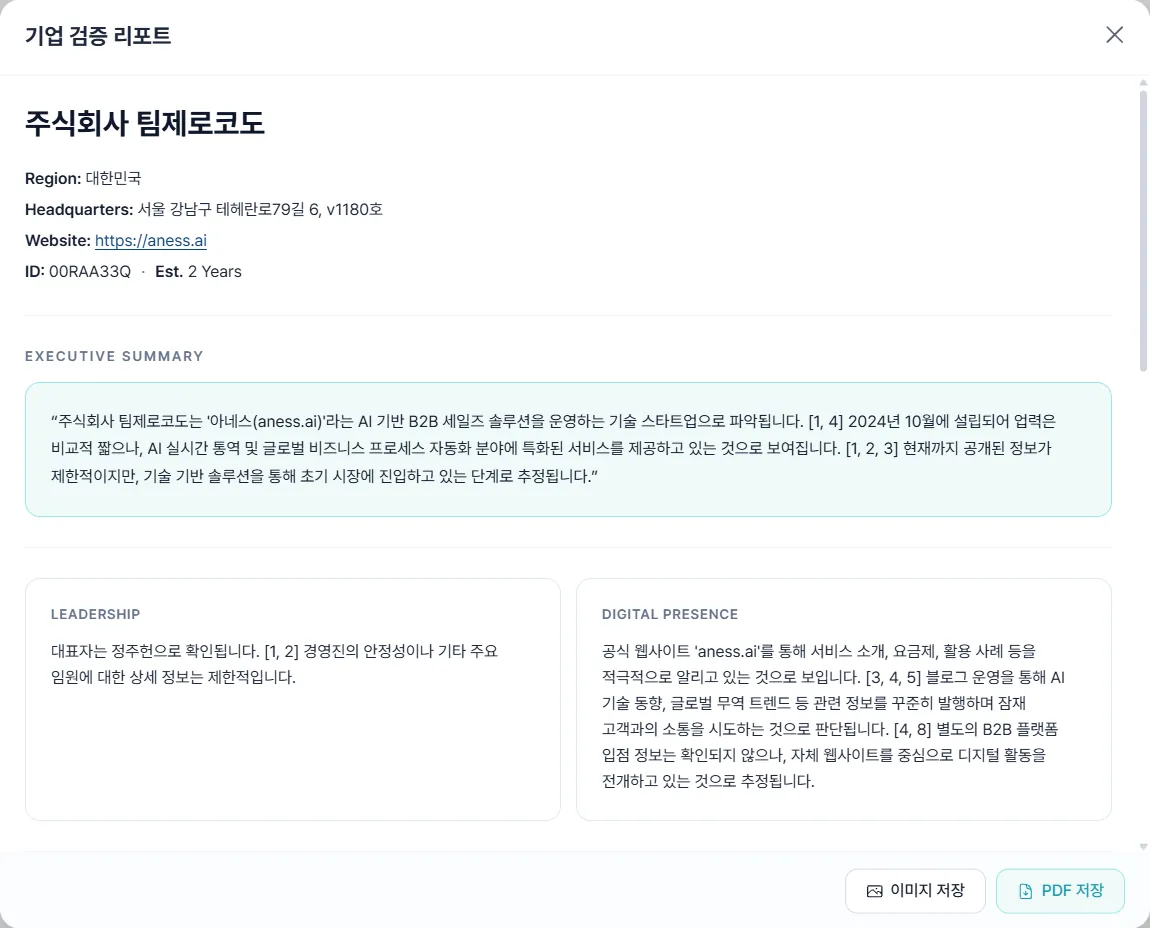
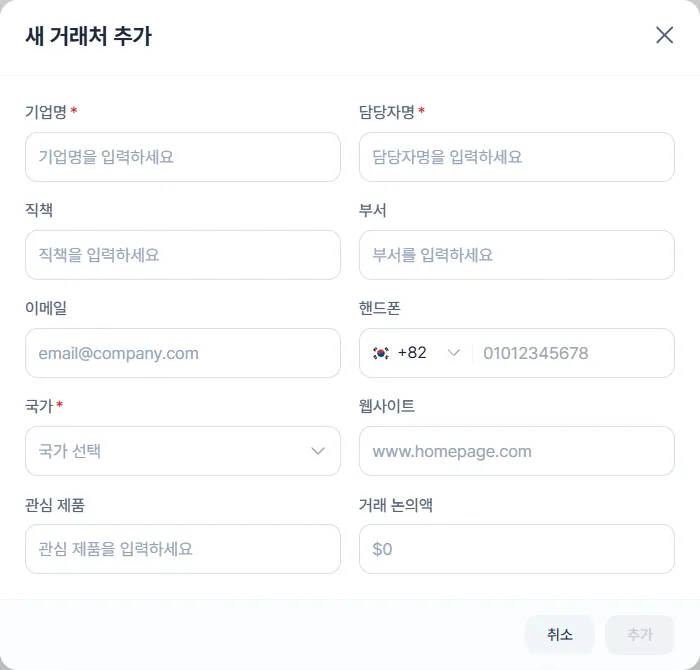
거래처 직접 추가하기Add a partner yourself
아네스를 거치지 않고 만난 기업도 넣어 둘 수 있습니다.Companies you met outside aness can go in too.
- 1[거래처 관리] 우측 상단 [거래처 추가하기] 를 클릭합니다.Click [Add partner] at the top right of [Partners].
- 2기업 정보를 입력해 저장하면 자동 등록된 거래처와 같이 관리됩니다.Enter the details and it is managed alongside the automatic ones.
아네스AI 사용 매뉴얼aness AI User Manual
설정Settings
담당자 정보와 우리 회사 정보를 관리합니다. AI 응대 품질에 직접 영향을 줍니다.Manage your own and your company’s details — they feed straight into the AI’s answers.
2026년 9월 기준 · 화면을 클릭하면 크게 볼 수 있습니다.As of September 2026 · click any screenshot to enlarge.
※ 화면 이미지를 클릭하면 크게 볼 수 있습니다.※ Click any screenshot to enlarge.
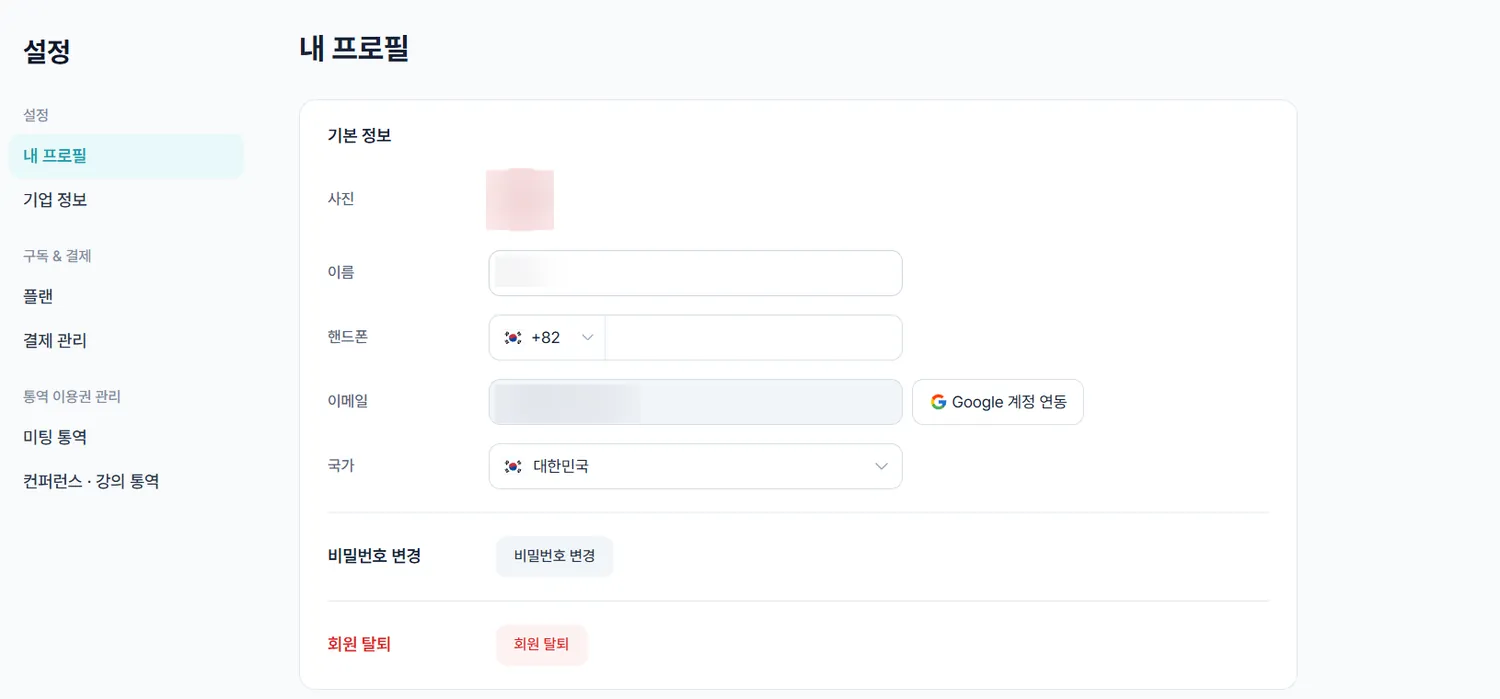
내 프로필 · 비밀번호Your profile and password
담당자 정보와 비밀번호를 관리합니다.Manage your own details and your password.
- 1좌측 맨 아래 [설정] 을 클릭합니다.Click [Settings] at the bottom of the left menu.
- 2[내 프로필] 에서 정보를 확인 · 수정한 뒤 저장합니다.Check and edit your details under [My profile], then save.
- 3[비밀번호 변경] 으로 비밀번호를 바꿉니다.Use [Change password] to change it.
 3
3기업 정보 입력하기Enter your company details
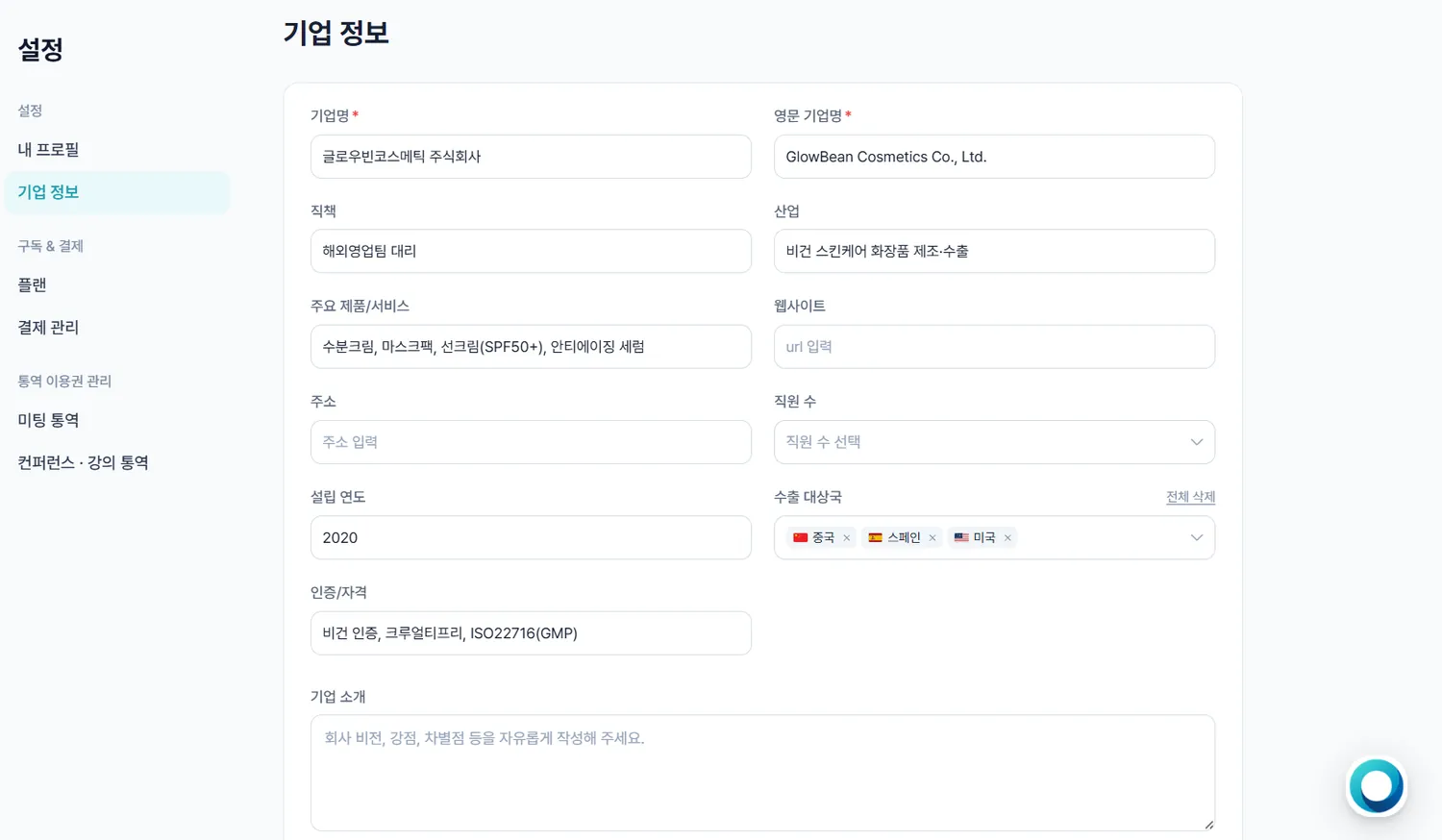
우리 회사 정보는 AI 응대와 기업 검증의 근거가 됩니다.Your company details are what the AI answers and verifies from.
- 1[설정] ▸ [기업 정보] 탭으로 이동합니다.Go to [Settings] ▸ [Company information].
- 2산업 · 기업명 등을 입력합니다.Enter your industry, company name and so on.
- 3직원 수는 1–10 / 11–50 / 51–200 / 201–500 / 500 이상 중에서 고릅니다.Pick a headcount band — 1–10, 11–50, 51–200, 201–500, 500+.
- 4입력을 마치면 저장합니다.Save when you are done.
 3
3Left blank or out of date, both get less accurate — so fill them in properly.
아네스AI 사용 매뉴얼aness AI User Manual
플랜 · 결제Plan & Billing
플랜을 구매하고 결제 수단과 인보이스를 관리합니다.Buy a plan, manage cards and pull invoices.
2026년 9월 기준 · 화면을 클릭하면 크게 볼 수 있습니다.As of September 2026 · click any screenshot to enlarge.
※ 화면 이미지를 클릭하면 크게 볼 수 있습니다.※ Click any screenshot to enlarge.
플랜 · 이용권 구매하기Buy a plan or a pass
아네스AI 플랜과 아네스노트 통역 이용권은 따로 구매합니다.The aness AI plan and the anessNote interpretation pass are bought separately.
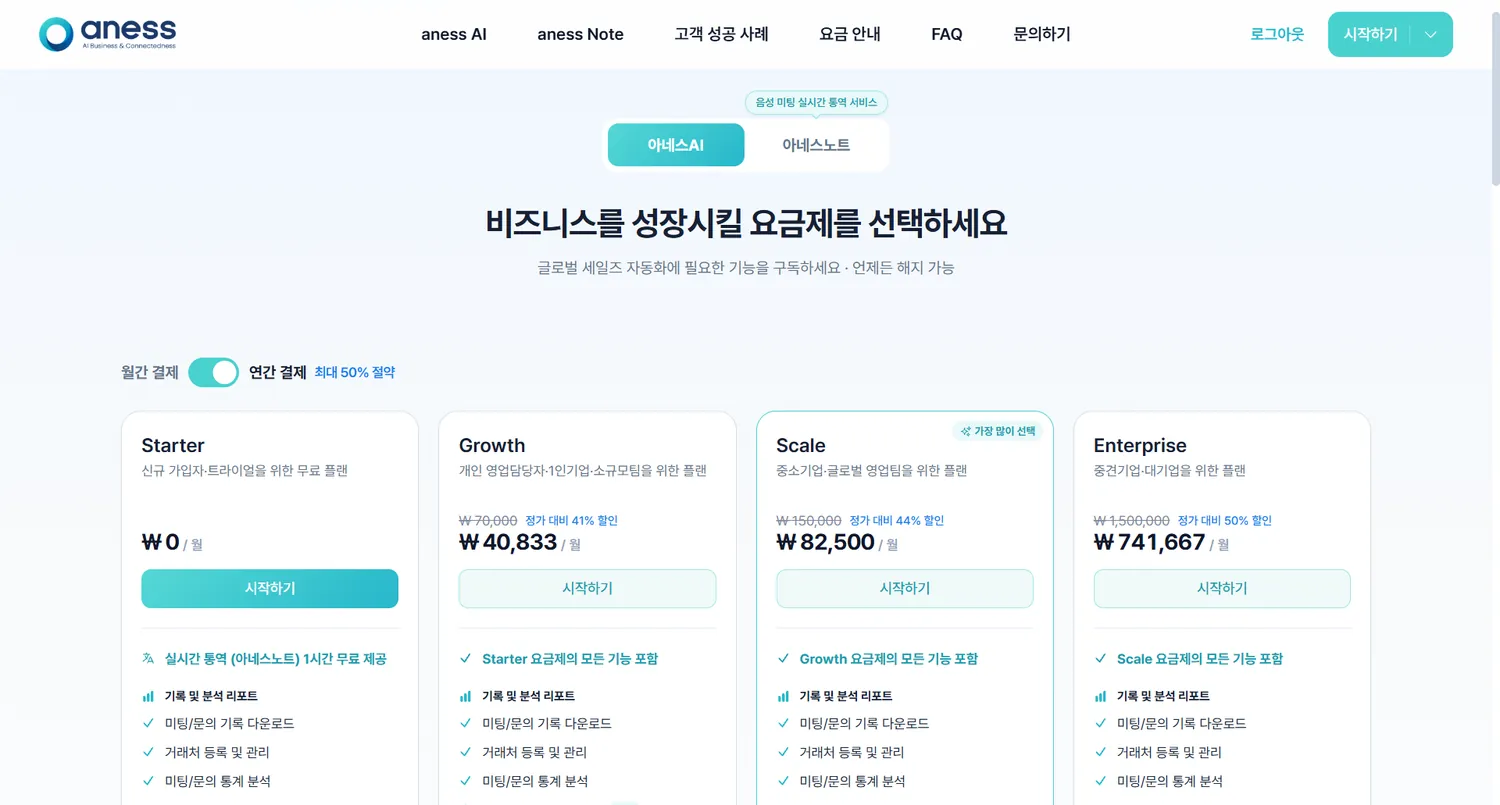
- 1아네스 홈페이지 상단 [요금 안내] 를 클릭합니다.Click [Pricing] at the top of the aness website.
- 2상품(아네스AI 또는 아네스노트)과 플랜을 고른 뒤 [시작하기] 를 누릅니다.Choose the product (aness AI or anessNote) and a plan, then press [Get started].
- 3등록된 카드가 없으면 [카드 등록] 을 먼저 마친 뒤 결제합니다.If no card is on file, complete [Add card] first, then pay.
 2
2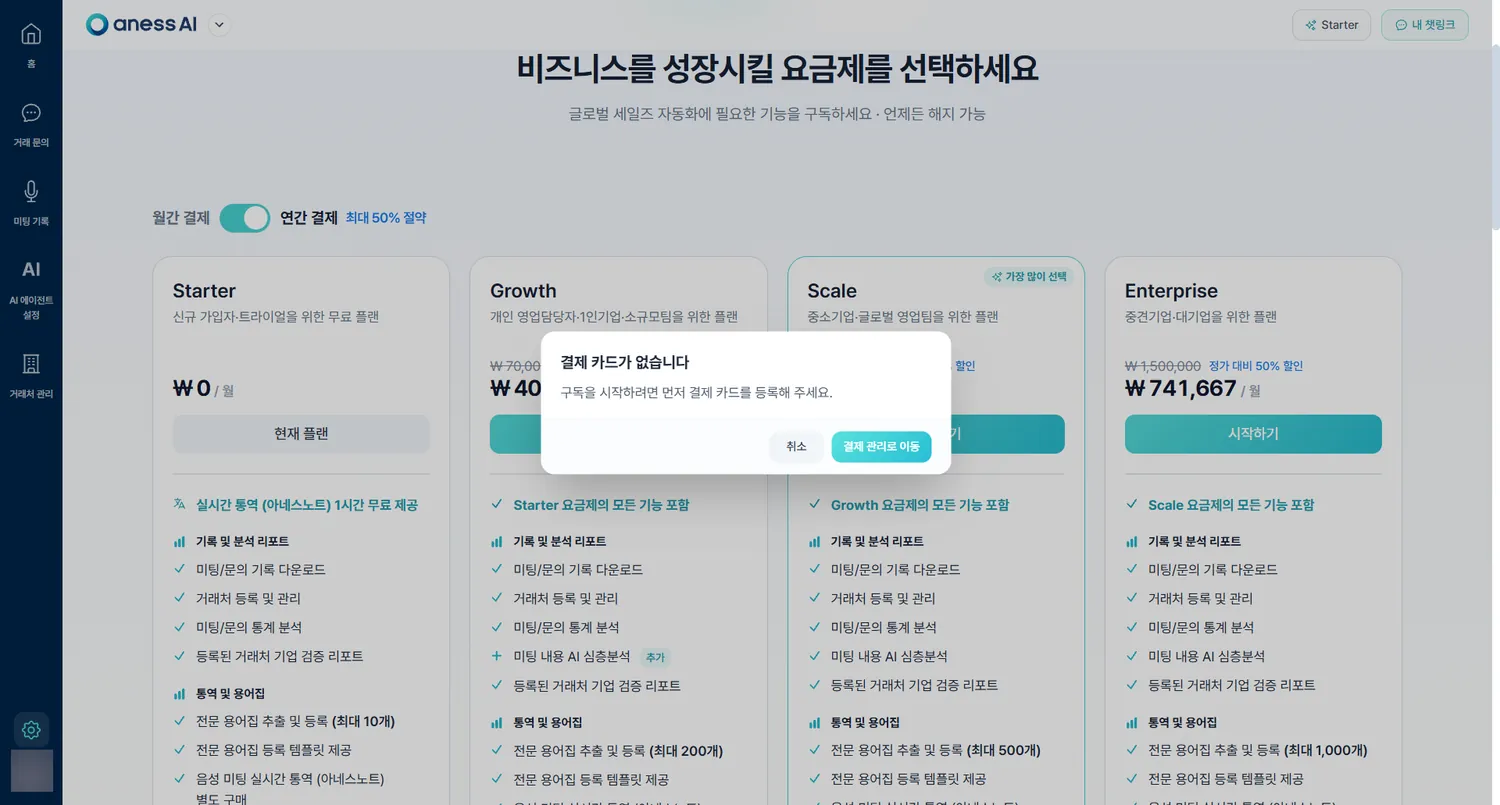 3
3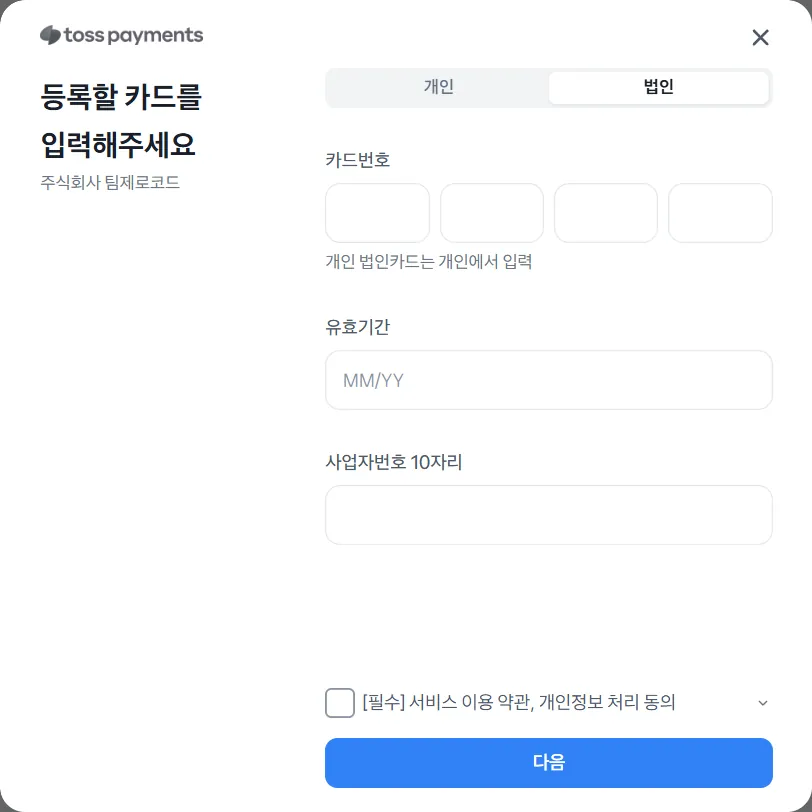
계정은 하나이므로 두 서비스를 같은 로그인으로 쓰십니다.aness AI is a four-tier subscription — Starter, Growth, Scale, Enterprise.
anessNote is bought as needed, as a period pass or a time package. One account, one login, both services.
플랜 확인하기Check your plan
지금 어떤 플랜이고 다음 결제가 언제인지 봅니다.See which plan you are on and when the next payment falls.
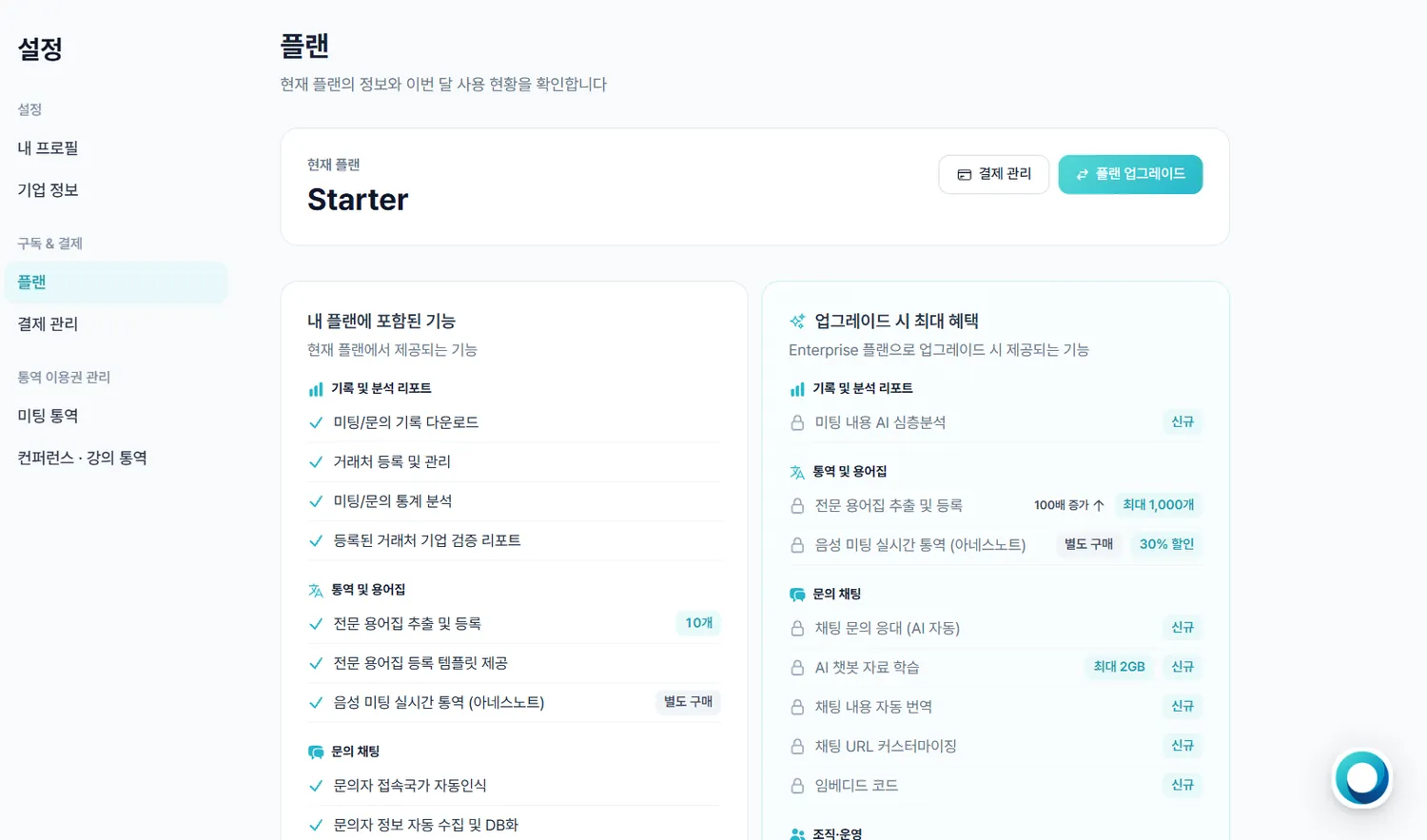
- 1대시보드에서 [설정] ▸ [플랜] 을 클릭합니다.In the dashboard, click [Settings] ▸ [Plan].
- 2현재 플랜과 그 플랜에 포함된 기능, 그리고 업그레이드하면 추가되는 기능이 나란히 나옵니다.You see your current plan, what it includes, and what an upgrade adds, side by side.
- 3플랜을 올리시려면 [플랜 업그레이드], 결제 수단을 보시려면 [결제 관리] 로 갑니다.Use [Upgrade plan] to move up, or [Billing] for payment methods.
 1
1Those appear once you subscribe to a paid plan.
결제 수단 · 내역 · 인보이스Cards, history and invoices
카드를 등록하고 지난 결제와 인보이스를 확인합니다.Register a card, and pull up past payments and invoices.
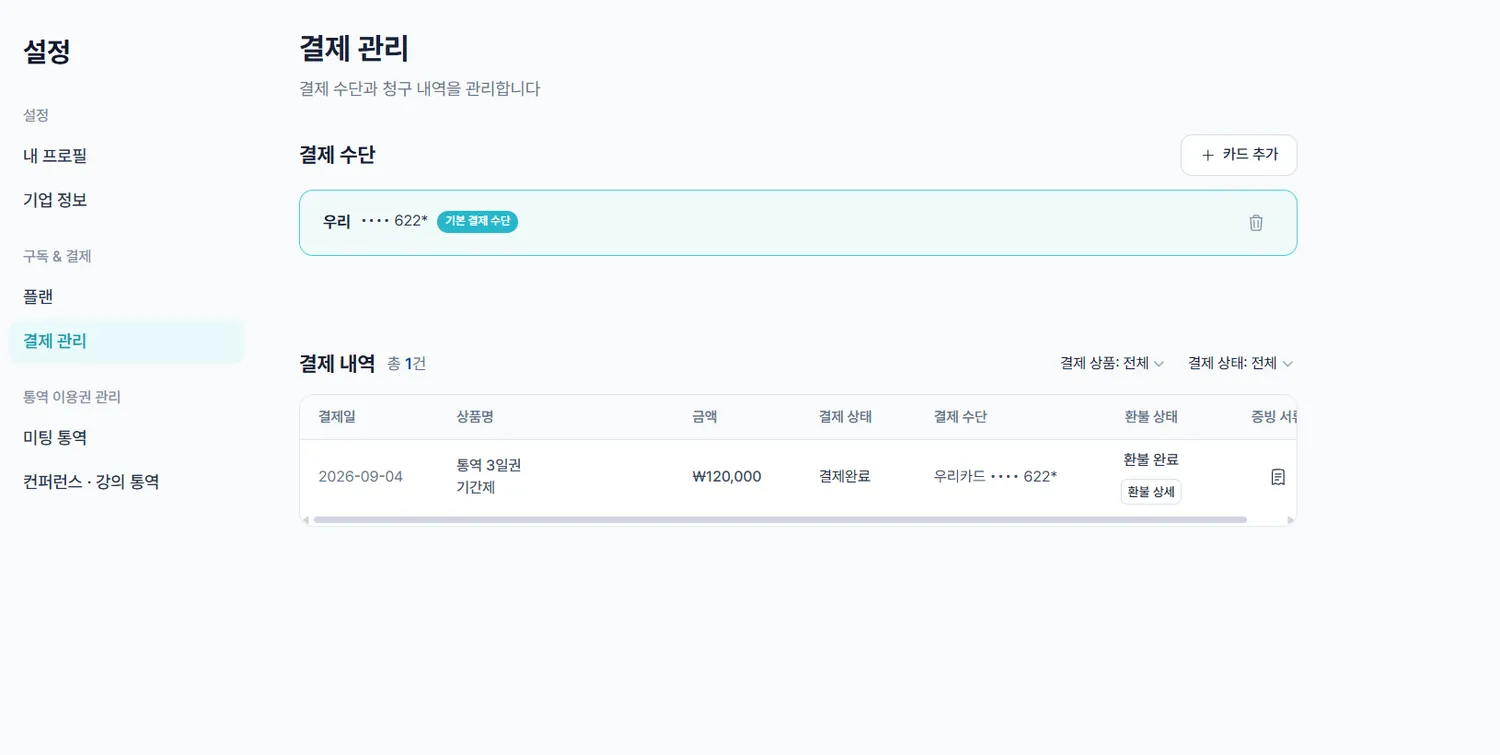
- 1[설정] ▸ [결제관리] 를 클릭합니다.Click [Settings] ▸ [Billing].
- 2[카드 추가] 로 카드를 등록하고 기본 카드를 지정합니다.Add a card with [Add card] and set the default.
- 3결제 내역을 확인하고 인보이스를 PDF로 내려받습니다.Review the payment history and download invoices as PDF.
 2
2환불은 정책에 따라 처리되며, 해당되시는 경우 문의를 통해 안내드립니다.For a tax invoice or a bank transfer, write to info@aness.ai. Refunds follow our published policy — get in touch and we will walk you through it.